
Refer to the exhibits. An IP phone is connected to port1 of FortiSwitch Access-1. The IP phone tags its traffic with VLAN ID 20. On FortiGate, VLAN IP_Phone (VLAN ID 20) has been configured, and port1 of Access-1 is set with VLAN 20 as the native VLAN. However, the IP phone cannot reach the network. The exhibit shows the partial VLAN configuration and the port1 configuration on Access-1.
Which configuration change must you make on FortiSwitch to allow ingress and egress traffic for the IP phone? (Choose one answer)
Correct Answer: C
According to theFortiSwitchOS 7.6 Administration GuideandFortiOS 7.6 FortiLink Guide, the processing of Ethernet frames on a managed FortiSwitch port depends on whether the frame is tagged or untagged upon arrival (ingress) and how the port’s VLAN membership is defined.
In the provided exhibit,port1is configured with set vlan ‘IP_Phone’ (VLAN 20) as itsnative VLAN. By definition, the native VLAN handles untagged traffic; any untagged frame arriving at the port is assigned to VLAN 20, and any egress traffic from VLAN 20 is sent out of the port without a tag. However, the scenario specifically states that theIP phone tags its traffic with VLAN ID 20.
When a FortiSwitch receives atagged frame, it checks the VLAN ID against theallowed-vlanslist configured on that port. Although VLAN 20 is the native VLAN, the exhibit shows that the port has been explicitly configured with set allowed-vlans ‘quarantine’. This creates a restrictive filter that permits only tagged frames belonging to the ‘quarantine’ VLAN to enter or exit the port. Because VLAN 20 (IP_Phone) is not present in the allowed-vlans list, the switch drops the tagged frames from the IP phone during ingress processing.
To resolve this, the administrator must modify theFortiSwitch port configurationby adding VLAN 20 to the allowed_vlans list (e.g., set allowed-vlans ‘quarantine’ ‘IP_Phone’ or set allowed-vlans-all enable). This ensures that the switch recognizes and permits tagged traffic for VLAN 20 on that physical interface. Option B is incorrect because l2forward is a Layer 3 interface setting on the FortiGate and does not address the physical port’s ingress filtering logic on the switch. Disabling the edge_port (Option D) relates to Spanning Tree Protocol (STP) convergence and would not impact VLAN tag filtering.
Refer to the exhibit.
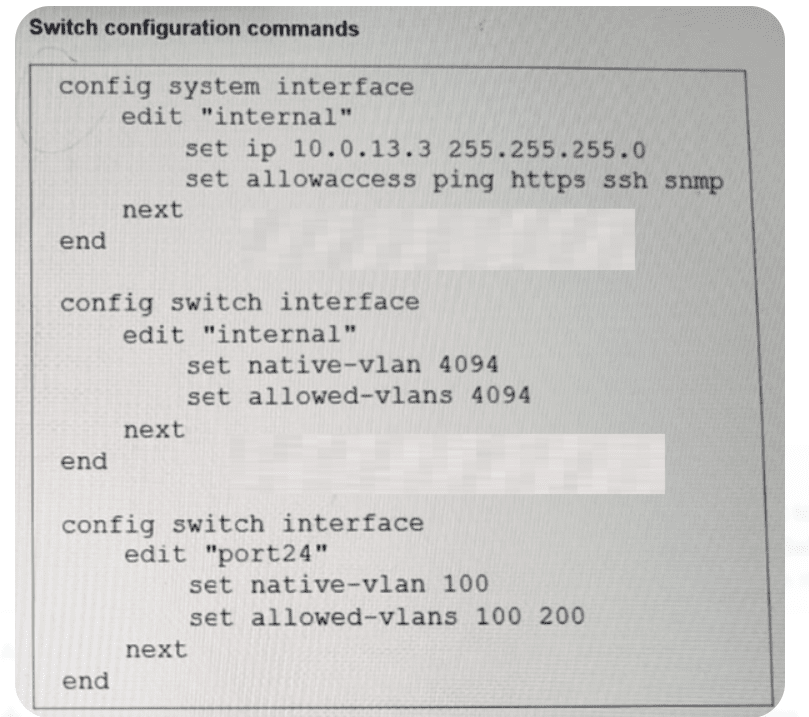
Port24 is the only uplink port connected to the network where you need access to FortiSwitch management services. However, FortiSwitch is not accessible on its management interface with IP address 10.0.13.3. Based on the configuration shown in the exhibit, which two actions should you take to fix the issue and access FortiSwitch? (Choose two answers)
Correct Answer: B, D
According to theFortiSwitchOS 7.6 Administration Guide (Page 320), management traffic on a FortiSwitch is associated with a specific logical interface, which in this case is the’internal’interface. The exhibit shows that the’internal’interface is configured onVLAN 4094(both as native and allowed). This means that for any management traffic (such as HTTPS, SSH, or SNMP) to reach the switch CPU, it must be able to traverse the physical uplink on VLAN 4094.
However, the configuration forport24(the uplink) is currently restricted. It is set withnative VLAN 100and an allowed-vlans list that only includes100 and 200. Because VLAN 4094 is not included in the allowed list of port24, all frames belonging to the management VLAN (4094) are dropped by the switch’s ingress/egress filters on the uplink.
To resolve this and restore management access, the administrator has two valid configuration paths based on the provided options:
Option B:Change thenative VLAN on port24 to VLAN 4094. By making 4094 the native VLAN, untagged management traffic can traverse the port, effectively allowing the ‘internal’ interface to communicate with the network.
Option D:Add VLAN 4094 to the allowed VLANs on port24. This ensures that VLAN 4094 is no longer filtered out, allowing management frames to pass through the uplink while maintaining the current native VLAN for other traffic.
Option C is irrelevant as removing a working VLAN (200) does not help the management traffic. While Option A describes an alternate architectural approach (moving management into an already-allowed VLAN), Options B and D represent the direct fixes for the mismatch described in the 7.6 administration documentation.
You need to mirror traffic from a source port on Switch A to a monitoring device on Switch C. For that purpose, you’re configuring Remote Switched Port Analyzer (RSPAN).1Due to the nature of RSPAN, what is the best practice when setting it up? (Choose one answer)
Correct Answer: B
According to theFortiSwitchOS 7.6 Administration Guideand theFortiSwitch 7.6 Study Guide, Remote Switched Port Analyzer (RSPAN) is a method used to monitor traffic across a network of switches by carrying mirrored traffic over a specific RSPAN VLAN. Because RSPAN floods mirrored traffic to all ports that are members of that specific VLAN across the intermediate switches (Switch B, etc.) until it reaches the destination port, it is critical to manage how that traffic is isolated.
The documentation explicitly states that the best practice is touse a dedicated VLAN assigned only to monitoring devices (Option B). When a VLAN is designated for RSPAN, the switch disables MAC address learning on that VLAN to ensure that the mirrored traffic—which contains the source and destination MAC addresses of the original conversation—does not interfere with the switch’s normal MAC address table entries for those devices.2
Using a VLAN that already carries regular data traffic (Option A) would result in a massive amount of duplicate traffic being flooded to normal production hosts, leading to network congestion and potential security risks. Similarly, using a dynamic VLAN that includes all ports (Option C) would cause the mirrored traffic to be broadcast to every port in the switch fabric, significantly degrading performance. Finally, using the RSPAN VLAN as a native VLAN (Option D) is not recommended because native VLANs typically handle untagged traffic, whereas RSPAN requires consistent tagging to ensure the mirrored packets stay within the isolated monitoring domain across trunk links. Therefore, creating a unique, dedicated VLAN that is used exclusively for the transport of mirrored traffic is the architectural standard for FortiSwitch RSPAN deployments.
Refer to the exhibit.
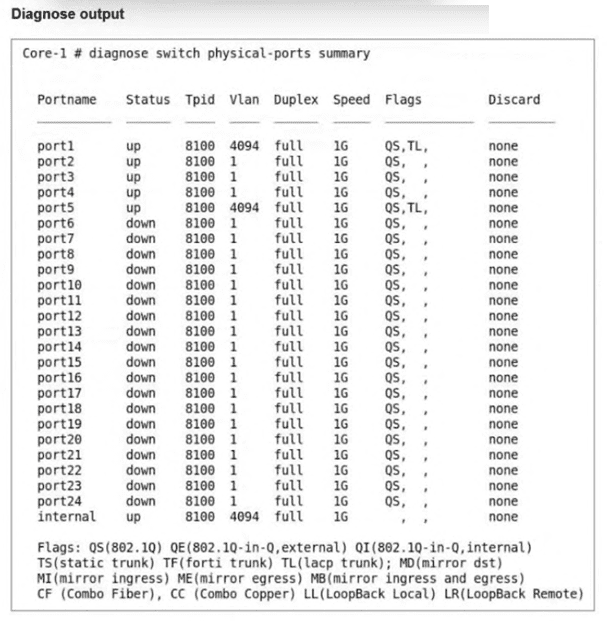
The command diagnose switch physical-ports summary is executed on FortiSwitch.
Based on the VLAN assignments shown in the output, what is the most likely management configuration of this FortiSwitch? (Choose one answer)
Correct Answer: B
The output of the diagnose switch physical-ports summary command provides critical insight into how a FortiSwitch is being managed by examiningVLAN assignments,tag protocol identifiers (TPID), andinternal port behavior. In the provided exhibit, several ports—includingport1,port5, and theinternalport—are assigned toVLAN 4094.
According to the FortiSwitchOS 7.6 Administrator Guide,VLAN 4094 is reserved for FortiLink management trafficwhen a FortiSwitch is managed by a FortiGate. FortiLink uses this dedicated VLAN to carry control-plane traffic such as configuration synchronization, monitoring data, LLDP-based discovery, and keepalive messages between the FortiGate and FortiSwitch. The presence of VLAN 4094 on physical interfaces is a strong and explicit indicator ofFortiGate-managed mode.
In standalone or local management mode, FortiSwitch ports typically default toVLAN 1or administrator-defined VLANs, andVLAN 4094 is not automatically assigned. Similarly, FortiSwitch Cloud–managed devices do not use VLAN 4094 in this manner, as cloud management relies on IP connectivity to FortiEdge Cloud rather than FortiLink encapsulation.
Additionally, the internal port showing VLAN 4094 further confirms FortiLink operation, as this internal interface is used by the switch ASIC to communicate with the FortiGate over the FortiLink tunnel. This behavior is documented in FortiOS 7.6 and FortiSwitchOS 7.6 design guides as characteristic of FortiGate-managed FortiSwitch deployments.
Therefore, based on the VLAN assignments shown—specifically the use ofVLAN 4094—the most accurate and fully verified conclusion is thatthe FortiSwitch is managed by FortiGate, makingOption Bthe correct answer.
Exhibit.
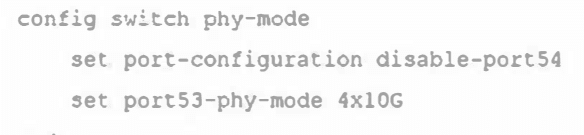
What conditions does a FortiSwitch need to have to successfully configure the options shown in the exhibit above? (Choose two.)
Correct Answer: B, C
Regarding the configuration of a FortiSwitch to split a port into multiple smaller interfaces:
The CLI commands are enabling a split port into four 10Gbps interfaces (Option B): The command shown in the exhibit is typically used to configure a high-speed port (like a 40Gbps or 100Gbps interface) to be divided into smaller, independent 10Gbps interfaces. This feature allows more flexible use of the switch’s physical resources.
The port full speed prior to the split was 100G SFP+ (Option C): Given the context of splitting the port into multiple 10Gbps interfaces, the original port configuration likely supported a high-speed transceiver such as 100G SFP+. This would make it technically feasible to divide the interface into multiple 10Gbps channels, enhancing connectivity options without requiring additional physical interfaces.
These configurations and capabilities are typical in modern network setups, especially in environments requiring high density and flexibility in connectivity, allowing network administrators to optimize physical infrastructure efficiently.





Prep2Certsis a premium service offering a comprehensive collection of exam questions and answers for over 1400 certification exams. It is regularly updated and designed to help users pass their certification exams confidently.
Please contact info@Prep2Certs.com and we will provide you with alternative payment options.
You can by Contacting our sales team.